Keyboard CPS Test 2.0: Live Charts, Heatmaps and Personal Records
key-test Editorial Team6 min read
Watch your speed, race your personal best and see where you lost your rhythm. Today's update adds live charts, heatmaps, new durations and more.
The Keyboard CPS Test now gives you a clearer view of every run. You can watch your pace as you play, race against your personal best, and see which keys you pressed and when. There is also a new one-second sprint, custom durations up to five minutes, and a fuller set of records and achievements.
Here is what changed in today's release, and how to use it on your next attempt.
Watch your pace and race your best run
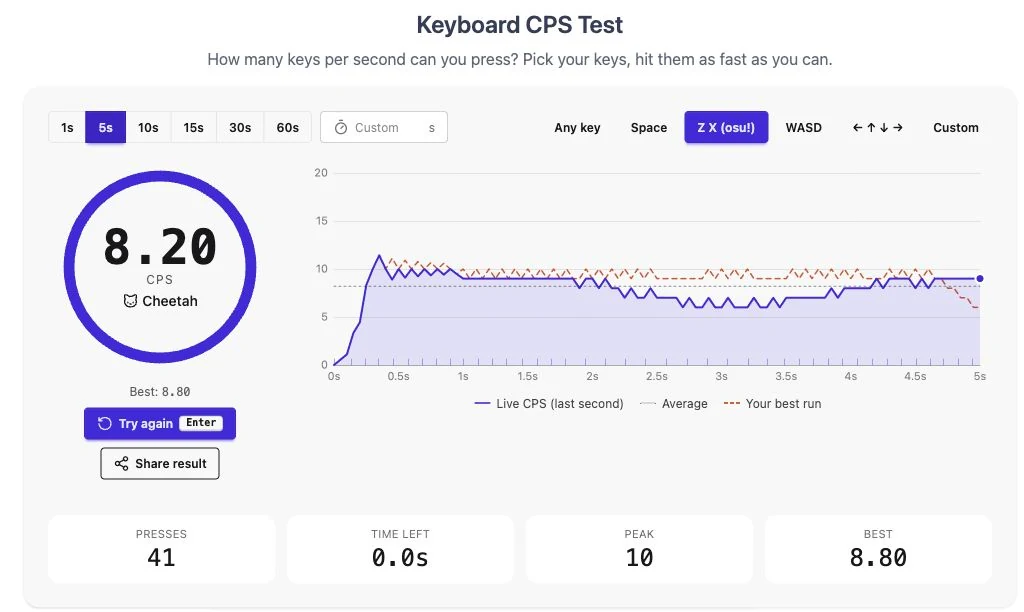
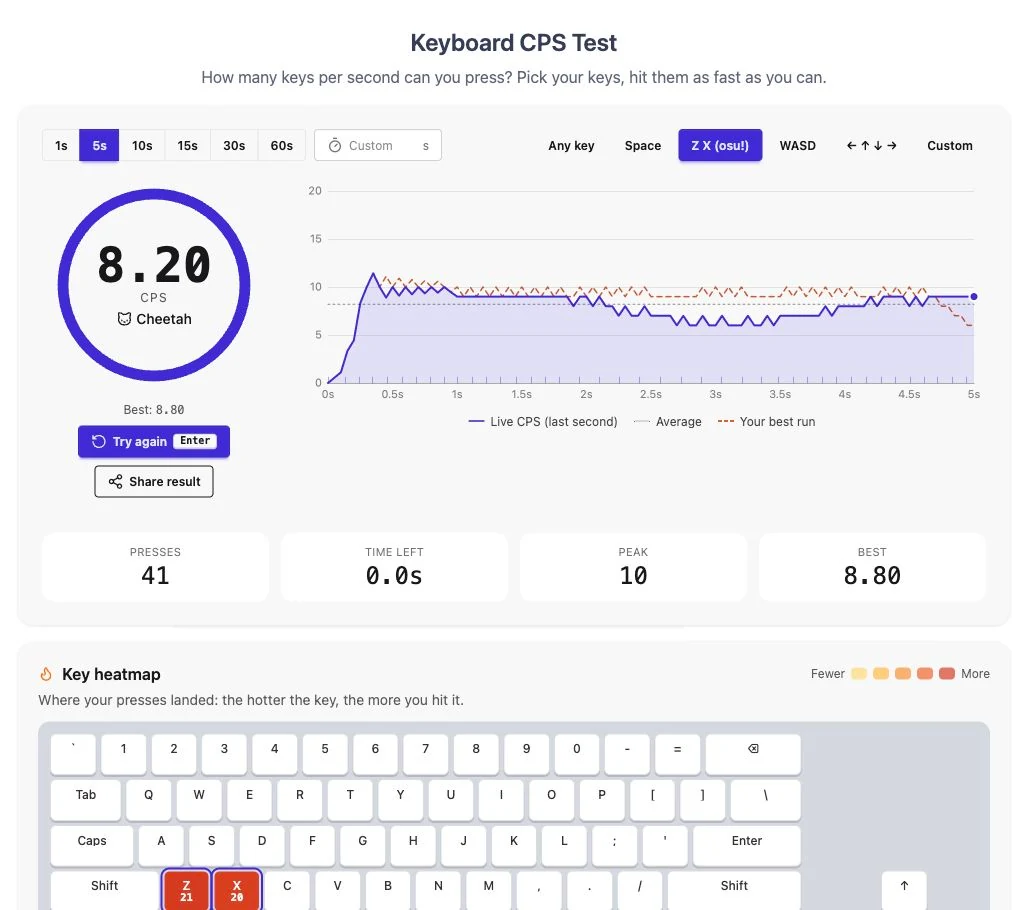
The new live chart draws your speed throughout the test. The purple line shows your pace over the last second; the dotted average line gives you a reference for the run as a whole. At the finish, the large CPS score is still your total presses divided by the test duration.
After you record a best score in the updated test, an orange dashed line lets you race it on your next attempt. It follows that run's pace at the same point in the test. You can see whether you are keeping up with your best opening, losing ground in the middle, or finishing more strongly. The comparison uses the same duration and key set.
We also fixed the empty space at the left of the chart. Both the current run and the personal-best curve now begin at zero seconds. The curve eases in over the first 300 milliseconds, so the opening presses appear without exaggerating a brief burst. This smoothing affects the chart; your final score and peak count still come from your recorded presses.
An older saved best score will still appear as a number. Its comparison curve becomes available when you set a new best with recorded timing data.
See where your presses landed
There are now two views of your key presses.
The key heatmap shows a keyboard that warms up as you play. Selected keys are outlined before the test starts, and the finished view puts a press count on each key you used. It is a quick way to check how evenly you split a Z/X run between two fingers.
The rhythm heatmap, below the result analysis, adds time to the picture. Each row is a key and each column is a short slice of the run. Darker cells contain more presses; pale or empty cells reveal gaps. Together, the two views show both your total use of each key and how that use changed during the test.
Read more from your result
The result analysis brings six measurements together:
- Score: your average key presses per second for the whole run.
- Peak: the most presses you landed in any one-second window.
- Consistency: how evenly spaced your presses were. A higher percentage means a more regular rhythm.
- Average gap: the average time between consecutive presses.
- Fastest repeat: the shortest gap between two presses of the same key.
- Max combo: the largest number of keys you held at once.
Short notes below the numbers point out useful details, such as a slower second half or the gap to your personal best. The score also gets a speed tier, from Turtle through to Comet, with the next target shown when there is one to aim for.
For practice, keep the duration and keys the same across attempts. Then use the curve and the consistency figure to see whether a faster score also came with a steadier rhythm. Some timing metrics need at least three presses, so very short runs may show a dash.
Try a one-second sprint or choose your own duration
The duration buttons now include 1s, alongside 5, 10, 15, 30 and 60 seconds. The custom field accepts any whole number from 1 to 300 seconds. Type a value and press Enter, or leave the field, to apply it.
Use a one-second sprint for a quick burst, or a longer test to see how well your pace holds up. The timer starts on your first valid press. Holding a key down still does not count as repeated presses: release it between taps.
The familiar key choices are all here: Any key, Space, Z/X, WASD, arrows, and a custom set of up to eight keys. In Custom mode, you can also click keys on the heatmap to select them. On a touchscreen, Any key mode lets you tap the large circle to try the test without a physical keyboard.
Keep your records and challenge a friend
The Your records panel puts your best scores for each duration in one place, with dates for newly recorded bests. You can click a recorded duration to switch back to that test. Your recent-run history remains grouped by duration and key set.
There are nine achievements to work toward, including finishing your first run, reaching double digits, completing a longer test and building a steady rhythm. Your record history, best-run timing data and achievements are saved in this browser. No account is required, and these records do not sync between devices; clearing the site's browser data removes them.
The new Challenge your friends section offers sharing options below your result. You can also use Share result to copy a score message and a link that opens the same keys and duration. Your friend gets the same setup to try, while your personal-best curve stays in your browser.
Available in all 32 languages
The updated interface, explanations and release notes are available in all 32 languages. We have revised the translated wording and adjusted labels and wrapping for smaller screens. The full release history is on the changelog.
To try the new comparison, open the five-second Z/X test, finish a run, then try the same settings again. Follow the orange curve and see where you can gain a little time.