Keyboard Test
A free online keyboard tester — just type :)
How to use the Key Test?
Start the test by typing your keys! You will see the keys on the virtual keyboard react accordingly and changes into a different color afterward. You may type a key as many times as you want, and there is a counter to let you check how many times you’ve typed.
There is also a bar above the keyboard to show you which keys you have typed.
If you want to reset the status of the virtual keyboard, click the “reset” button on the top right corner of this page.
Why should I take the Key Test?
key-test.com is an online tool to test your keyboard’s performance. It will let you know which keys are working properly and which are not. It will also let you feel the latency of a key's input, or how many times the key-press event would be fired if you press and hold a key.
If you are a pro gamer, it's imperative to own a keyboard that reacts as fast as possible and feels suitable for your hands and fingers, especially for player of the following games: “Grand Theft Auto(GTA)”, “Fortnite”, “Dota”, “Call Of Duty”, “Minecraft”.
Can I check keyboard latency or input delay?
Yes. Every key press lights up on the virtual keyboard the moment your keyboard sends it, so you can feel input delay directly. Hold a key down to watch how fast repeat key events fire — a quick way to spot a laggy or faulty key.
Does the keyboard tester measure APM and CPS?
Yes — while you type, the bar above the keyboard tracks your APM (actions per minute) and CPS (keys per second) in real time, together with a small chart of your typing speed. Great for checking how fast your keyboard and your fingers really are. For a dedicated speed challenge with any key or multi-key mode, try the Keyboard CPS Test.
How do I check if my keyboard is damaged?
Press each key once and watch the virtual keyboard. A healthy key lights up every time and its counter goes up by exactly 1 per press. A key that never lights up is dead; a key that fires on its own is stuck; a key that counts 2 or more for a single press has a chattering switch. One slow pass across the board takes under a minute and works for both laptop and external keyboards.
What is keyboard ghosting — and does mine have it?
Ghosting means some key presses vanish when several keys are held together. Hold 3–5 keys at once (try W, A and Shift): every held key should stay lit on the virtual keyboard. If one disappears, you have found your keyboard's rollover limit — good to know before an important game blames your fingers.
Is this Key Test Free?
Yes! key-test.com is completely free. The website is implemented in pure JavaScript. We don't store any data, so it's also fast, light-weighted, and privacy-friendly.
How many keyboard layouts do you support?
Besides the PC and Mac views, you can pick the physical layout of your keyboard from the “Layout” menu above the virtual keyboard: US and UK QWERTY, AZERTY, QWERTZ, Dvorak, Colemak, Spanish, Italian, Portuguese, Nordic, Turkish, Russian, Arabic, Hebrew, Greek, Thai, Korean, Japanese JIS and more — 28 layouts in total. The tester always detects the physical key you press, so every layout works on any keyboard; switching only changes what is printed on the virtual keycaps. See all keyboard layouts.
Is this key test safe?
As it is mentioned above. The website is implemented in pure JavaScript (code runs in your browser), and we don't store any data. So we don't spend extra costs, and you don't have to pay anything.
Is there any other way to test my keyboard?
Try this Typing Test. See if you can reach 100 WPM!
Can I reset the status?
Sure. Sometimes after typing a lot of keys, the virtual keyboard is a bit messy. You may click the “Reset” on the top right corner to reset everything back to its initial status.
Any easter-egg in this test?
Try to type the following keys “EASTRG-” as many times as possible. Maybe you'll get some luck :).
Does this key test support mobile devices?
Yes and no. You can use this key test with a mobile phone that has a physical keyboard. For instance, Blackberry. Most phones that with a virtual keyboard doesn't need a key test. Instead, you may try some other online tests.
Fun Facts about Key Test
Q: What is the most tested key?
A: Control on Windows. ⌘ (command) on Mac.
Most tested keys on Windows:
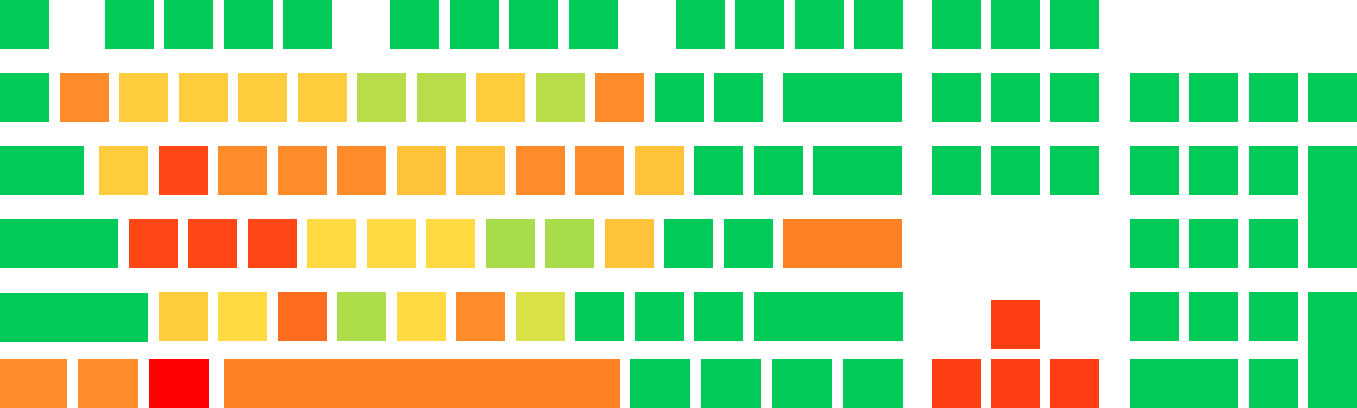
Data anonymously collected via Google Analytics during Dec 2022 to Oct 2023 (10% sampled)
Most tested keys on Mac:
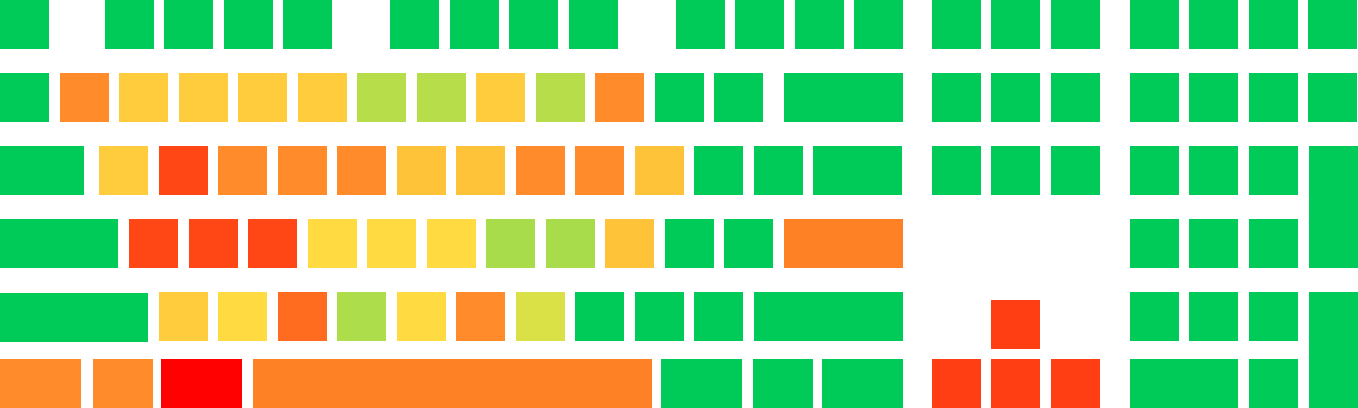
Data anonymously collected via Google Analytics during Dec 2022 to Oct 2023 (10% sampled)